
If you manage Telegram groups, communities or customer lists, sending messages or inviting users one by one can quickly become a time-consuming task. The problem becomes even more noticeable when you need to work with a large list of usernames and want to distribute the activity across multiple Telegram accounts.
TexSender is a Windows software designed to simplify Telegram bulk operations directly from your PC. Among its most useful features are bulk message sending, bulk member invitations and multiple-account rotation.
Instead of performing every operation from the same account, TexSender can rotate between multiple configured accounts after a specified number of operations. This makes it much easier to organize campaigns and manage different Telegram profiles from a single Windows application.
Multiple Telegram Accounts in One Software
The first step is adding the Telegram accounts that you want to use with TexSender. Multiple accounts can be configured inside the software and then selected for supported bulk operations.
This is particularly useful if, for example, you manage several business profiles, community accounts or Telegram identities and do not want to manually log out and log back in every time you need to change account.
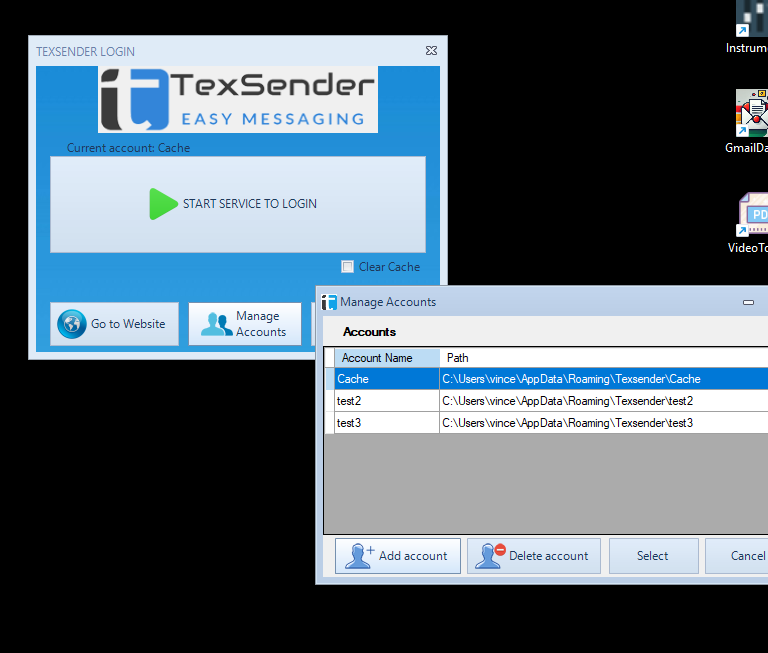
Once the accounts have been added, TexSender can use them sequentially according to the rotation settings selected for the operation.
Bulk Invite with Multiple Accounts in Rotation
One of the most useful functions for Telegram group administrators is Bulk Invite.
Instead of manually searching for each username and adding it to a group, you can prepare or import a list of Telegram usernames and let TexSender process them automatically.
With the multiple-account option enabled, you can select several Telegram accounts and specify how many invitations should be processed before switching to the next account.
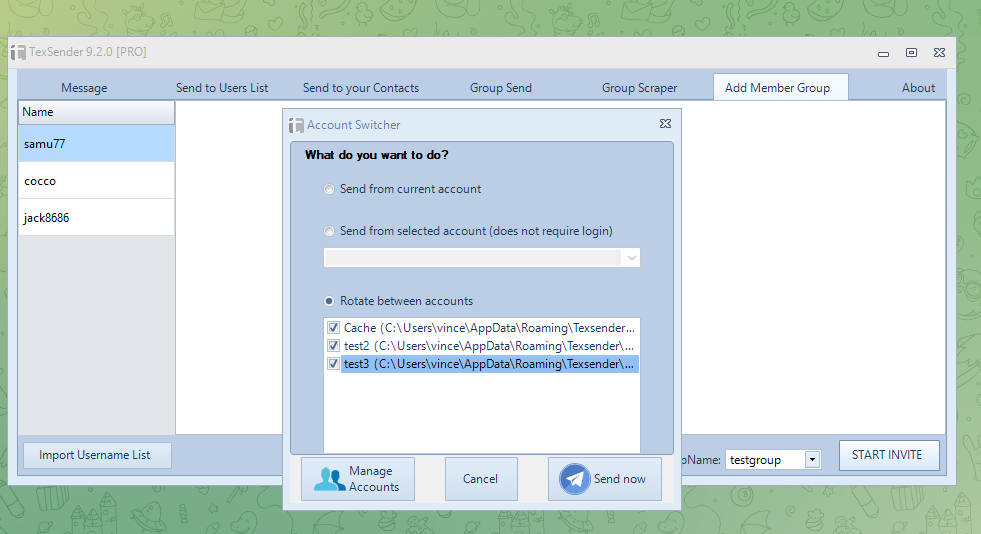
The basic workflow is simple:
- Select the Telegram group where you want to invite members.
- Load or prepare the list of Telegram usernames.
- Select the Telegram accounts that should be used.
- Choose how many invitations should be processed before changing account.
- Start the Bulk Invite operation.
TexSender then processes the usernames automatically and rotates between the selected accounts according to your settings.
Send Bulk Telegram Messages with Multiple Accounts
The same multi-account approach can also be used for bulk Telegram messages.
TexSender lets you prepare a list of recipients and automatically send your message to them. Depending on the operation, recipients can include Telegram contacts or username lists.
You can write the message once and then select multiple accounts for the sending process.
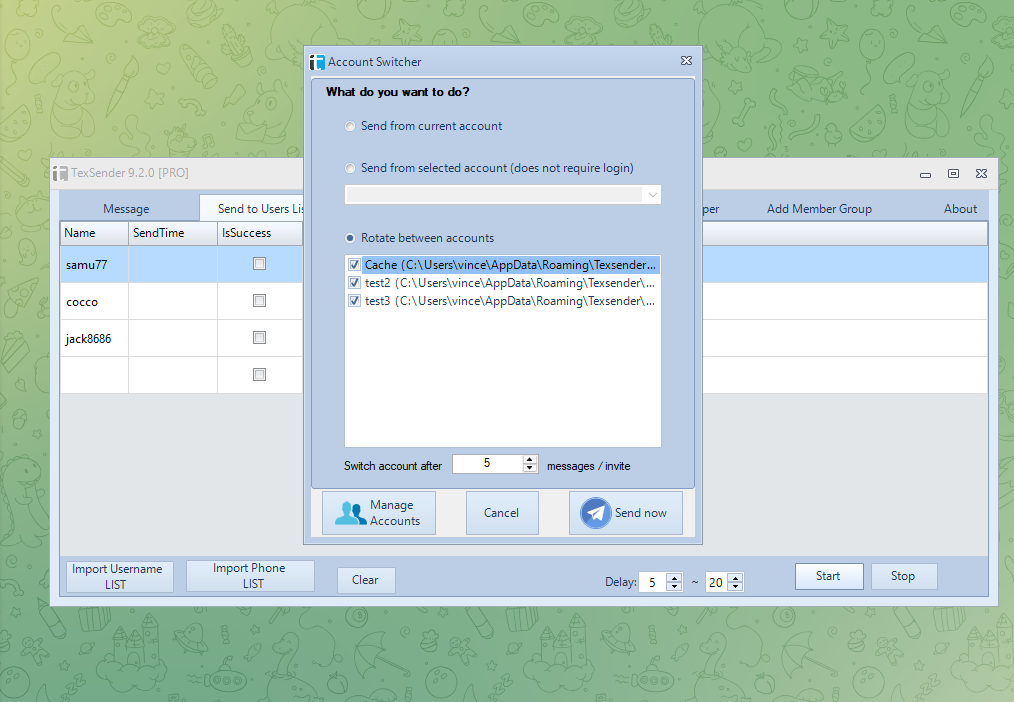
For example, if you configure several accounts and select a rotation after a certain number of processed messages, TexSender can automatically move to the next configured account rather than requiring you to stop the campaign and manually change the Telegram session.
How Account Rotation Works
The concept is straightforward. Imagine that you have three Telegram accounts:
Account 2
Account 3
If the rotation value is configured to switch after a certain number of operations, TexSender starts with Account 1, processes the configured quantity, changes to Account 2, continues with the next recipients and subsequently switches to Account 3.
Once all selected accounts have been used, the rotation can continue according to the operation and settings configured in the software.
This means you do not have to continuously monitor the computer simply to change Telegram accounts manually.
What Can You Send?
TexSender is not limited to plain text. Depending on the selected sending function, Telegram messages can include different types of content such as:
- Text messages
- Links
- Emoji
- Images
- Documents and other attachments
This makes the software useful for announcements, customer communications, community management, updates and other legitimate Telegram messaging activities.
Bulk Invite vs Bulk Message Sender
| Feature | Bulk Invite | Bulk Message Sender |
|---|---|---|
| Main purpose | Invite users to a Telegram group | Send Telegram messages to recipients |
| Username lists | Yes | Yes |
| Multiple accounts | Yes | Yes |
| Automatic rotation | Yes | Yes |
Why Use TexSender Instead of Doing Everything Manually?
Telegram itself is excellent for normal conversations, but repetitive operations can become inconvenient when you have hundreds of contacts or usernames to manage.
TexSender provides a Windows interface specifically designed to automate those repetitive steps. Instead of continuously copying usernames, searching Telegram, opening conversations, sending messages or changing accounts manually, you can organize the operation from one place.
The major advantages are:
- Less repetitive work when processing long recipient lists.
- Multiple Telegram accounts managed from the same application.
- Automatic account rotation during supported operations.
- Bulk Invite for adding users to groups.
- Bulk Message Sender for contacting username or contact lists.
- Operation logs that make it easier to understand which recipients were processed successfully.
A Note About Telegram Limits and Responsible Use
Automation does not remove Telegram’s own rules and restrictions. Telegram can limit invitations or messaging based on account reputation, user privacy settings, group permissions and anti-spam systems.
TexSender should therefore be used with contacts and communities where your communication is expected and legitimate. If Telegram rejects an operation, repeatedly changing accounts should not be considered a way to circumvent a platform restriction.
Using reasonable delays, relevant recipient lists and appropriate messaging practices provides a much better experience for both administrators and recipients.
Conclusion
If you regularly work with Telegram from a Windows PC, the ability to combine bulk messages, bulk invitations and multiple-account rotation can save a considerable amount of repetitive work.
TexSender centralizes these operations in a single application: add your Telegram accounts, prepare the recipient or username list, configure the rotation and start the operation.
Try TexSender for Windows
Send Telegram bulk messages, manage username lists and use multiple accounts in rotation from your PC.
Frequently Asked Questions
Can TexSender use multiple Telegram accounts?
Yes. Multiple Telegram accounts can be configured and selected for supported sending and invitation operations.
Can I rotate accounts automatically while sending Telegram messages?
Yes. The multi-account functionality can change the active account after a configurable number of processed operations.
Can I invite a list of usernames to a Telegram group?
Yes. The Bulk Invite feature is designed to process Telegram usernames and attempt to add them to the selected group.
Does a successful request always mean that Telegram added the user?
No. Telegram ultimately controls whether an invitation is accepted. User privacy settings, group permissions and Telegram restrictions can prevent individual users from being added.
Can account rotation bypass Telegram limits?
No. Account rotation is an automation and account-management feature. Telegram’s privacy, anti-spam and platform restrictions still apply to every account.